Use CDP/LLDP/EDP to find the nearest switch name and port information, and confirm link speed, duplex, and TCP/IP network connectivity with AutoTest.
The LinkRunner AT can be used as a PoE load tester and test up to 30W 802.3af/at PSE using TruePower™ loaded Power over Ethernet (PoE) test.
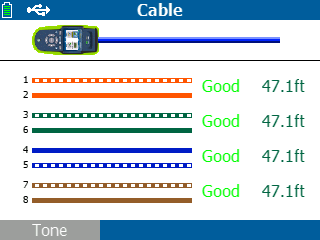
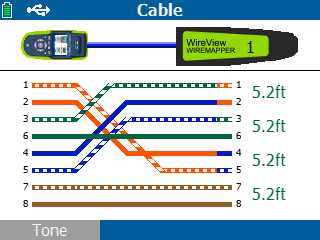
Quickly verify twisted-pair cable length and wire-map.
Automate reporting and enable collaboration with upload and management test results via Link-Live™.
Perform twisted-pair/copper cable testing (LRAT-1000 and LRAT-2000 models) and fiber optic testing (LRAT-2000 only).
How to use a Network Cable Tester? Test it yourself and see how easy it is to use a LinkRunner® AT. Click on the orange dots to explore. This is the Home Screen The LinkRunner AT is a rugged, fast, and complete copper and fiber Ethernet network connectivity tester. It performs an essential set of network connectivity tests, enabling you to quickly and accurately identify and solve network connectivity problems. The LinkRunner AT Network AutoTester is available in two models: LRAT-2000 and LRAT-1000. Features LinkRunner AT-2000
Several features of the LinkRunner AT-2000 cannot be added to the LinkRunner AT-1000.
These exclusive features of the LinkRunner AT-2000 include:
Fiber support TruePower™ PoE Power Test up to 30W (PoE cable tester)
IPv6 support Reflector support
More reports: 50 instead of 10
Uses Li-ION rechargeable battery instead of an AA battery pack
Locating Cables
Find cable routes using toning, switch port advertisement, switch port link light blinking, and remote cable identifiers. Toning supports both analog and digital IntelliTone modes.
Cable Wire Mapping and Length Measurement
Verify the integrity of patch cables by utilizing the wiremap port, which allows for pin-to-pin connection checking, as well as measuring length, detecting shorts, opens, and split pairs in the installed wiring. Effortlessly identify opens, shorts, miswires, and split pairs through three distinct methods:
On non-terminated cables.
Using a WireView Cable Identifier.
Through the built-in wiremap port located on the side of the LinkRunner AT.
The LinkRunner AT offers a packet reflector mode, which enables you to conduct end-to-end network path performance tests remotely. This mode validates LAN and WAN throughput capabilities up to 1Gbps. The reflector mode can be configured to swap MAC and/or IP addresses. LinkRunner AT-2000 supports packet reflection for:
OneTouch™ AT Network Assistant
EtherScope™ Network Assistant
Any device generating 802.3 frame or IP packet streams
The Link-Live collaboration, reporting, and analysis platform acts as a central system for managing test results and devices. It streamlines workflows by allowing easy logging, documenting, and reporting of test activities from various network testers like LinkSprinter, LinkRunner AT, LinkRunner G2, LinkRunner 10G, AirCheck G3, and EtherScope nXG. When your tester is connected to Link-Live, test results are automatically uploaded to the dashboard for project management and reporting. You can also upload additional files, screenshots, images, profiles, packet captures, location information, and comments whenever needed. Moreover, certain NetAlly tester with AllyCare Premium Support can receive firmware updates directly from Link-Live. An API is available to retrieve and integrate data from Link-Live into other management platforms, such as trouble-ticket applications or network management systems. This allows for easy proof-of-performance and improved job and staff efficiency management. The unified dashboard displays both wired and WiFi network connectivity results, providing the following benefits:
Reduces management overhead for multiple testers and users.
Facilitates collaboration between on-site personnel and remote experts.
Simplifies report generation for documenting network deployments across different media types.
Enables attachment of photos and user comments to each result, providing context for future changes and troubleshooting.
Supports asset management by associating serial numbers of installed devices and/or cable/wall jack labels with specific tests.
Local Reporting Mode
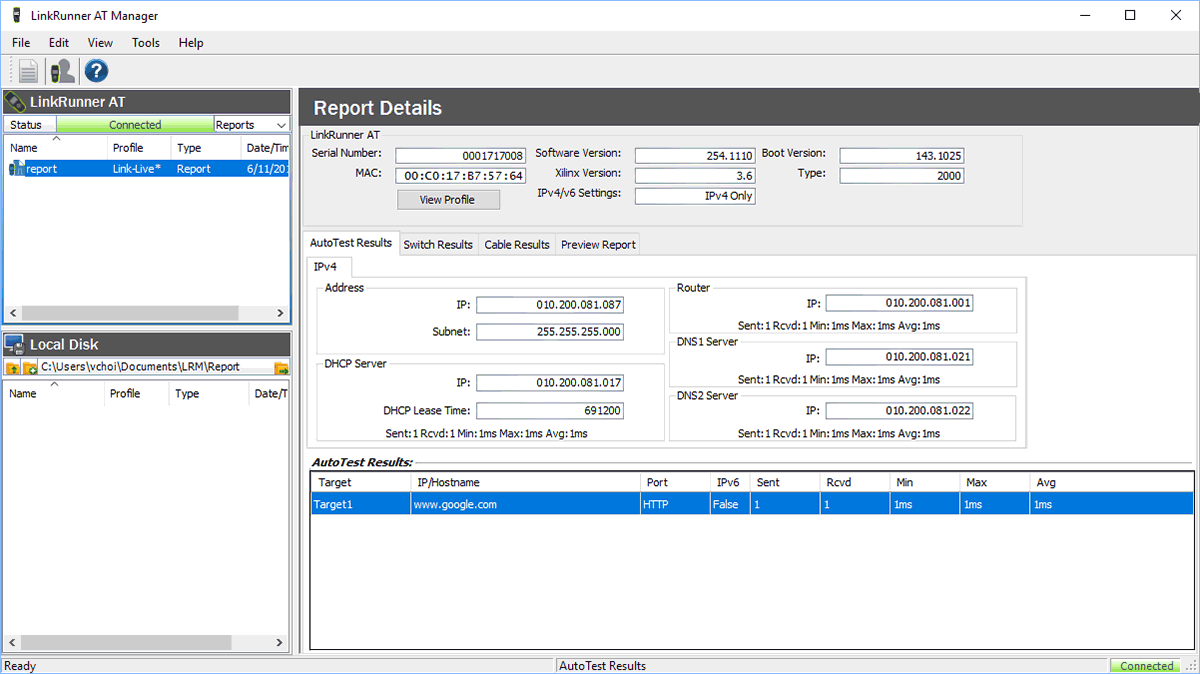
You also have the option to activate the Local Reporting Mode, which allows you to conveniently save AutoTest results directly on the tester itself. When the AutoTest results are saved locally, you can utilize the LinkRunner AT Manager Software, which is compatible with MS Windows, to efficiently manage and analyze test results, generate test reports, and manage your testers. While the LinkRunner G2 and LinkRunner AT are both network testers that help IT and System Integrators verify and troubleshoot Ethernet access networks, the LinkRunner G2 is has an Android-based operating system and a smartphone-like user interface. The LinkRunner G2 includes test features that provide visibility, versatility, and value beyond the LinkRunner AT. More detail about Hexo Industries (M) Sdn Bhd
Hexo Industries (M) Sdn BhdMeasuring Instruments Supplier Malaysia, Leak Detection Systems Supply Penang, Power Tools Supplies Singapore, Indonesia ~ Hexo Industries (M) Sdn Bhd



 Malaysia

