Description
AutoTest
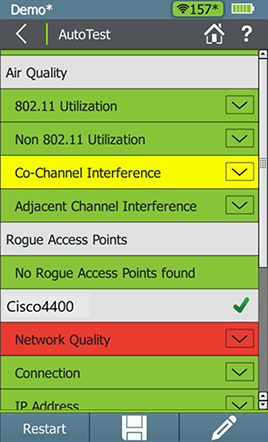
AirCheck G2 performs the following five essential WiFi tests and provides a pass/fail indication of the wireless environment, as well as identifies common problems — for any level of expertise:
- 802.11 Utilization – Reports channels in each band (2.4 GHz and 5 GHz) with the highest airtime utilization.
- Non-802.11 Utilization – Reports channels with the highest non-802.11 airtime utilization, indicative of interference sources and high noise levels.
- Co-Channel Interference – Reports channels with the most APs on the same channel that exceed the minimum signal level threshold.
- Adjacent Channel Interference – Reports interference on a channel caused by APs that are operating on other channels that overlap with that channel.
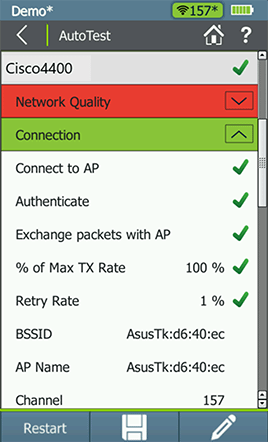
- Network Quality – Verifies coverage, interference, security, and ability to connect to specified networks, along with the availability of critical network services such as DHCP and connectivity to specified network targets.
- Rogue Access Points – Reports APs other than your authorized devices. These devices may be compromising network security.
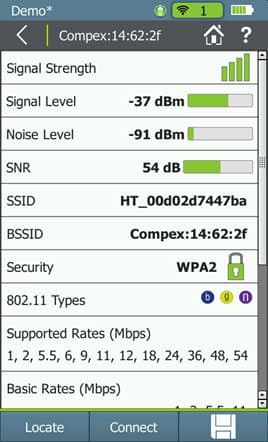
 Access Point Discovery
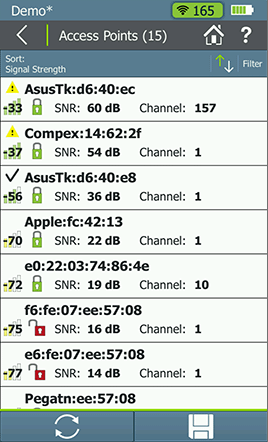
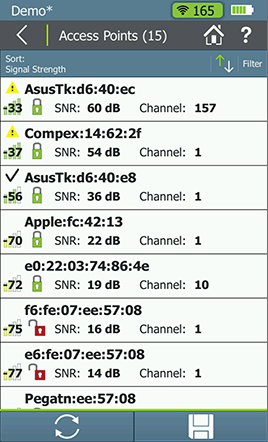
Quickly view all the APs present in the environment and see critical parameters for each one, including signal level, signal/noise ratio, security type, and channel. Find common issues such as incorrect security type, poor signal coverage, or incorrect channel.
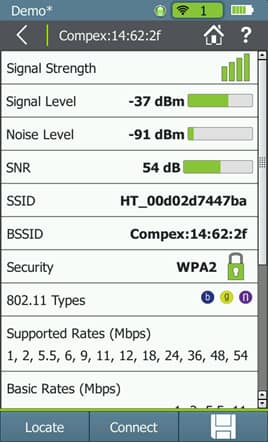
Sort or filter by any parameter, then drill into any AP to set its authorization level and see more details, including number of connected clients, supported rates, 802.11n/ac/ax capabilities and more. From the AP details page, drill into a list of connected clients, or the channel on which the AP operates to verify any channel utilization or co-channel interference problems.
From here you can also use a locator tool to find an AP, set Access Control status (ACL), or you can perform a packet capture.
Access Point Discovery
Quickly view all the APs present in the environment and see critical parameters for each one, including signal level, signal/noise ratio, security type, and channel. Find common issues such as incorrect security type, poor signal coverage, or incorrect channel.
Sort or filter by any parameter, then drill into any AP to set its authorization level and see more details, including number of connected clients, supported rates, 802.11n/ac/ax capabilities and more. From the AP details page, drill into a list of connected clients, or the channel on which the AP operates to verify any channel utilization or co-channel interference problems.
From here you can also use a locator tool to find an AP, set Access Control status (ACL), or you can perform a packet capture.
 Network Connection Tests
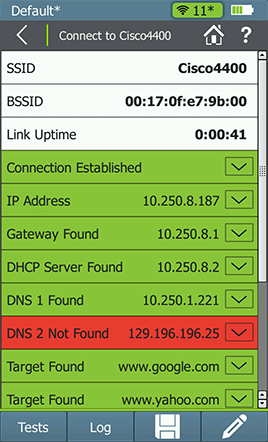
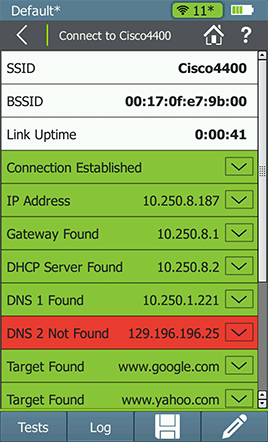
Verify network availability and access to critical services by connecting to a network (SSID) or AP with a single touch on the Connect button. Key test steps include:
Network Connection Tests
Verify network availability and access to critical services by connecting to a network (SSID) or AP with a single touch on the Connect button. Key test steps include:
- Associate with AP
- Request and receive an IP address from a DHCP server
- Ping the default gateway and DNS servers for availability
- Perform a ping or TCP port test on up to ten network targets
- Conduct ongoing signal level, signal/noise ratio, and retry rate measurements
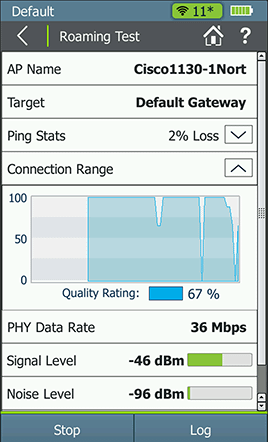
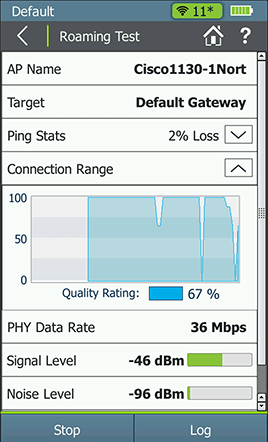
Once connected to a network, perform a roaming test to validate that roaming is enabled on the network, or run an iPerf performance test to verify throughput capabilities on the network.
 Wired Ethernet Tests
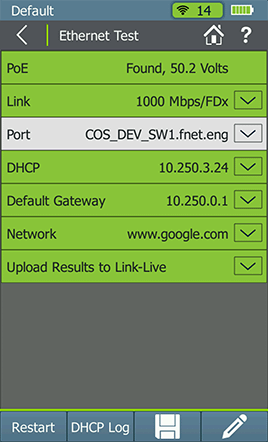
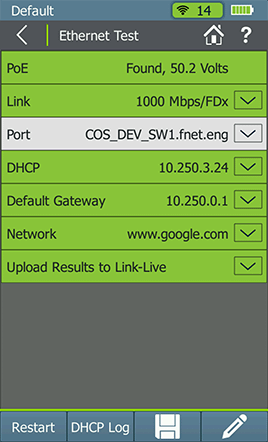
The AirCheck G2’s built-in Ethernet test validates that APs have a working backhaul connection to the network.
Wired Ethernet Tests
The AirCheck G2’s built-in Ethernet test validates that APs have a working backhaul connection to the network.
- Diagnose and test Power over Ethernet (PoE), link to the switch, DHCP, Gateway, and Internet connections.
- Get VLAN, switch name, and port information via CDP/LLDP/EDP for your managed switches.
 AirMapper™ Site Survey app
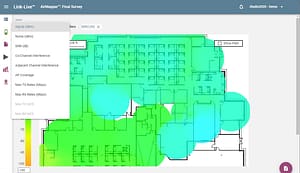
With the AirMapper app, AirCheck G2 users can quickly and easily gather location-based WiFi measurements and create visual heat maps of key performance metrics in the Link-Live Cloud Service or AirMagnet Survey PRO. Simple to use, the AirMapper app is ideal for quick site surveys of new deployments, change validation, and performance verification.
AirMapper™ Site Survey app
With the AirMapper app, AirCheck G2 users can quickly and easily gather location-based WiFi measurements and create visual heat maps of key performance metrics in the Link-Live Cloud Service or AirMagnet Survey PRO. Simple to use, the AirMapper app is ideal for quick site surveys of new deployments, change validation, and performance verification.
- Complete faster and easier WiFi site surveys with an entirely mobile platform
- Perform enterprise-grade surveys without the need of a dongle or tethered device
- Collaborate – easily visualize and share survey data through Link-Live Cloud Service
- Active surveys provide visibility into actual user experience, including roaming performance.
 Simplified Collaboration, Project Management, and Automated Reporting
Collaborate with staff across your organization with centralized visibility of distributed tests, speeding resolution of remote site issues.
Simplified Collaboration, Project Management, and Automated Reporting
Collaborate with staff across your organization with centralized visibility of distributed tests, speeding resolution of remote site issues.
- Complimentary Link-Live Cloud Service stores test results and site data uploaded for automated reporting and documentation.
- Simplifies report generation across media types for network deployment documentation.
- Generate WiFi site survey heat maps using the AirMapper™ Site Survey App on AirCheck G2.
- Site survey project management capabilities provide a major boost in productivity and collaboration for distributed teams conducting surveys at remote sites. A team lead can now create a project in Link-Live, upload and calibrate the floor plan, then automatically push the configured project out to the desired handheld instruments.
- Reduces results management overhead for multiple testers and users.
- Attach photos, user comments to each result, adding context for future changes and troubleshooting.
- Available API enables seamless data integration between Link-Live and trouble-ticket or network management systems.
More detail about Hexo Industries (M) Sdn Bhd

 Malaysia