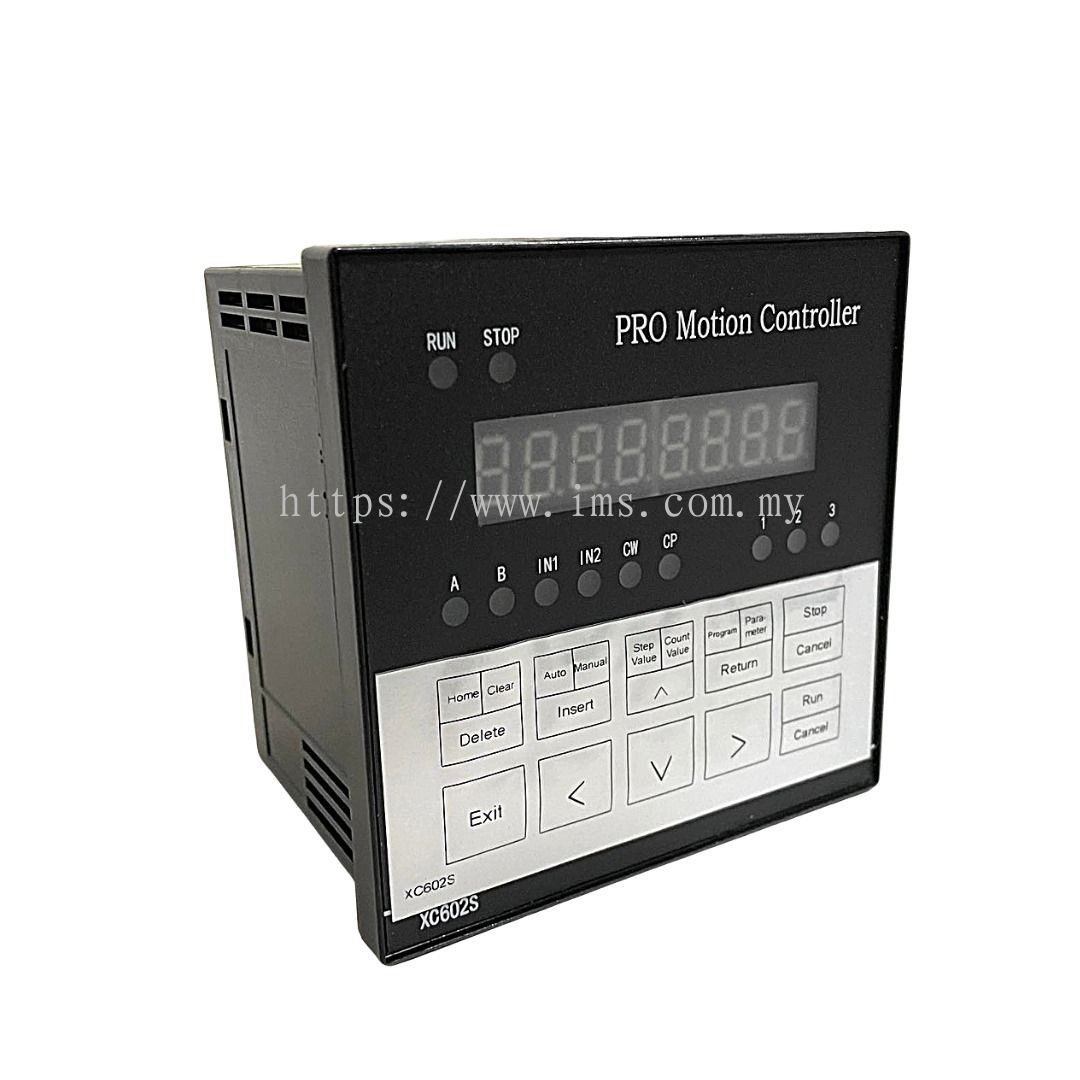
Description
Specification
- Axis number : Single axis control
- Instruction Features: Programmable coordinating control and Manual jog control
- Maximum output frequency: 40KHz (suitable for controlling sub-division drive)
- Output frequency resolution: 1Hz
- Programmable lines: Maximum 99 lines
- Input ports : 6 (photoelectric isolated)
- Output ports : 3 (photoelectric isolated)
- Continuous displacement range: -7999999 ~ +7999999
- Operating modes: Automatic, Manual, Program Editor, Parameter Settings
- Speed curve : 2 (optimization)
- Display digits : 8 digital display
- Display modes : Manual/Automatic status display; Run/Stop status display; Step count/Count value/Program display; Program editor/Parameter display, Input/output status display, CP pulse and CW direction display
- Auto-run : Program is editable, start and stop of the automatic operations is controlled using buttons on the panel of the controller and the level applied to the terminals
- Manual operation : Jog coordinate, Jog speed and Step count can be adjusted manually
- Parameter setting : Starting rate, Speed curve, Reverse gap adjustment, Length
 System Features :
● Control axis: Single;
● Program Features: Programmable of positioning control and Jog control);
● The maximum output frequency: 40KHz (particularly suitable for controlling sub-division drive);
● Output frequency resolution: 1Hz;
● Programming number: maximum 99;
● Input point: 6 (optical isolation);
● Output points: 3 (optical isolation);
● One continuous displacement range: -7999999 ~ + 7999999;
● Operating: automatic operation / manual operation. Program Mode, Parameter Mode;
● Speed curve: 2 (optimization);
● Display digits: 8 digital display, manual / automatic status display, run / stop status display, the number of steps / count value / program display, edit the program, parameter display, input / output status display, CP pulse and direction display ;
● Autorun feature: It can edit & can control the start and stop automatic operation and other operations at the terminal level panel buttons and processing;
● Manual operation functions: adjustable position (manual jog speed and jog number of steps can be set);
● Parameter setting function: You can set the frequency jump, lifting speed curve, backlash, manual length, manual speed, interrupt jump the line and back to zero velocity;
● Program Edit function: arbitrarily insert, delete can modify the program. With a jump line number, the data sentence zero, the number of long and short statement judgments wrong function;
● Back to Zero function: two-way automatic return to zero;
● Programming instructions: A total of 14 instructions;
Outside the operating functions: interrupt operation through parameter setting and operation on the A and B terminals plus switch executable external operations;
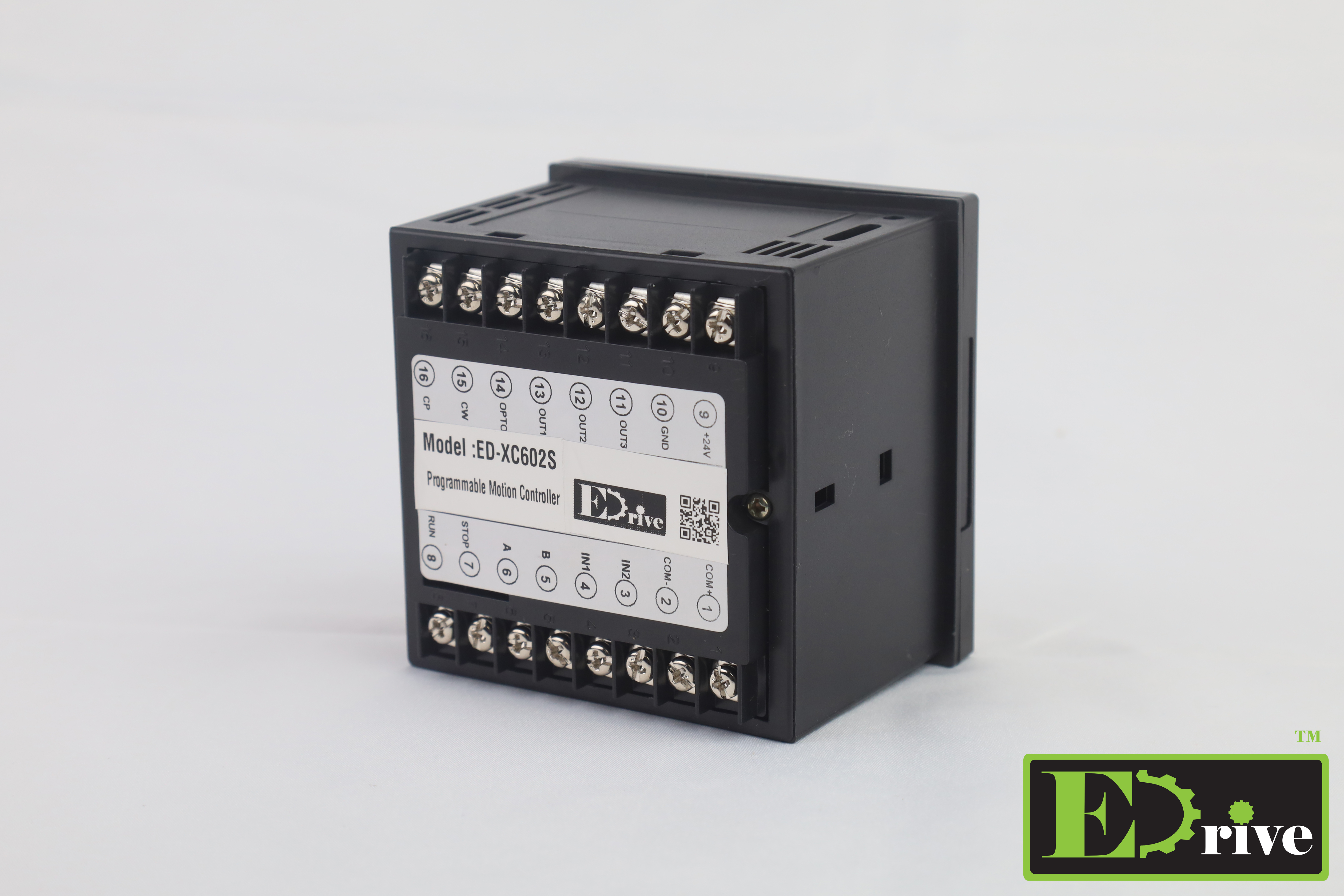
● Working voltage: DC24V
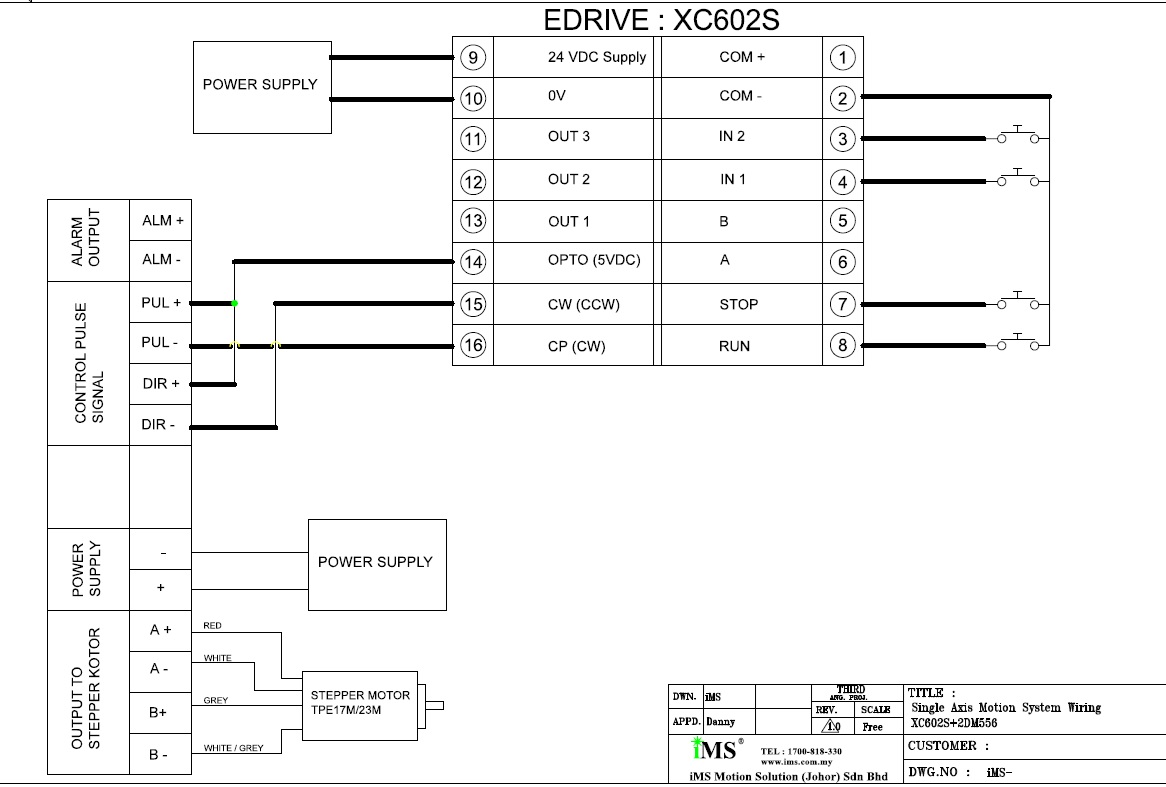
The EDRIVE XC602S can directly drive the 2DM556 stepper driver, thereby controlling the TPE23M motor, via pulse + direction control mode.
Core Compatibility and Control Logic
- Table: Device Role Control Method Key Parameter Matching
- XC602S Motion Controller High-speed pulse output Up to 40kHz, meeting 2DM556 requirements
- 2DM556 Stepper Driver Pulse/Direction Input Supports 200kHz input, backward compatible with 40kHz
- TPE23M Actuator Motor Receiver driver drives NEMA 23 specification, compatible with 2DM556 current range
Wiring and Parameter Settings
Wiring: Connect the XC602S outputs PUL+/- and DIR+/- to the 2DM556's PUL+/- and DIR+/- respectively; connect the 2DM556 to the TPE23M motor power line and encoder line according to standard.
Settings:
- Set the 2DM556 to pulse + direction mode, signal voltage matched to 24V (consistent with XC602S).
- Microstepping and current settings should be configured according to the TPE23M's rated parameters. It is recommended to enable hybrid attenuation to reduce step loss.
- Program the XC602S for positioning/jogging; optimize acceleration/deceleration curves according to operating conditions.
About TPE23M:
The TPE23M is a high-performance stepper motor of NEMA 23 specification, belonging to the ElectroCraft TorquePower series, and its drive capability (1.0–5.6A) is fully matched to the 2DM556.
Communication and Expansion Notes:
- The XC602S is a pulse-type controller and does not support bus communication such as EtherCAT; the bus function of the 2DM556-EC version cannot be directly enabled.
- For bus control, it can be replaced with a bus-type controller supporting EtherCAT/Modbus, or an RS232 communication module can be added to the 2DM556.
Key points for debugging:
- Ensure reliable grounding; use shielded twisted-pair cable for the pulse line; keep it away from power lines to prevent interference.
- First, perform a jog test for forward and reverse rotation, then gradually increase the speed and acceleration to avoid losing steps.
The following are the most practical and easy-to-use tutorials and materials for the EDRIVE XC602S single-axis motion controller, organized according to "Official Manual → Wiring/Programming → Debugging/Practical Operation → General Reference" to help you get started quickly.
1. XC602S Product Specifications and Function Manual (NEWPAGES)
Contents: Complete parameters, panel operation, 14 commands, IO definitions, homing/jogging/automatic operation modes.
2. XC607 Series User Manual (Highly Compatible with XC602S)
Contents: Panel Operation, Parameter Settings, Programming Commands, Wiring, Zeroing, Jogging, Program Editing.
II. Wiring and Hardware Connection (Must Read)
1. Single-Axis Controller General Wiring Guide (Compatible with XC602S + 2DM556 + TPE23M)
Key Points: PUL+/PUL-, DIR+/DIR-, EN+/EN-, 24V common ground, shielded wire, IO isolation.
2. Stepper System Wiring Steps (2DM556 + TPE23M)
Steps: Power Supply → Driver → Motor Power Line → Encoder → Controller Pulse / Direction / Enable.
III. Programming and Panel Operation (Core)
1. XC602S Panel Operation Illustrated Tutorial (Original Document)
Contents: Manual/Automatic Switching, Jogging, Zeroing, Parameter Setting, Program Editing, Usage of 14 Commands.
2. Introduction to Single-Axis Controller Programming (General)
Key Points: Positioning commands, speed curves, homing parameters, IO linkage, program loops/jumps.
IV. Debugging and Troubleshooting (Hands-on)
1. Three-Step Method for Stepper System Debugging (Adapted to Your Combination)
Wiring Check → 2. Driver Microstepping / Current Setting → 3. Controller Pulse Frequency / Acceleration/Deceleration Optimization.
2. Common Problems: Missing Steps, Jittering, No Rotation
Causes: Poor grounding, poor shielding, microstepping mismatch, excessive acceleration/deceleration, insufficient current.
V. Video Tutorials (Intuitive)
1. Single-Axis Motion Controller Wiring + Programming + Debugging
Content: Panel operation, parameter settings, program writing, trial run, IO testing.
2. Stepper Motor + Driver + Controller Complete Debugging (Douyin)
Content: From wiring to positioning, speed adjustment, zeroing, anti-interference settings.
- First, read the XC607 manual (most complete) to familiarize yourself with the panel and commands.
- Connect XC602S → 2DM556 → TPE23M according to the wiring guide.
- Test the hardware using jogging/zeroing to ensure it functions correctly.
- Write a simple positioning program, optimizing the speed/acceleration/deceleration/microstepping parameters.
- Add IO linkage and external triggering to complete the automation process.
More detail about IMS Mechatronics Sdn Bhd

 Malaysia