
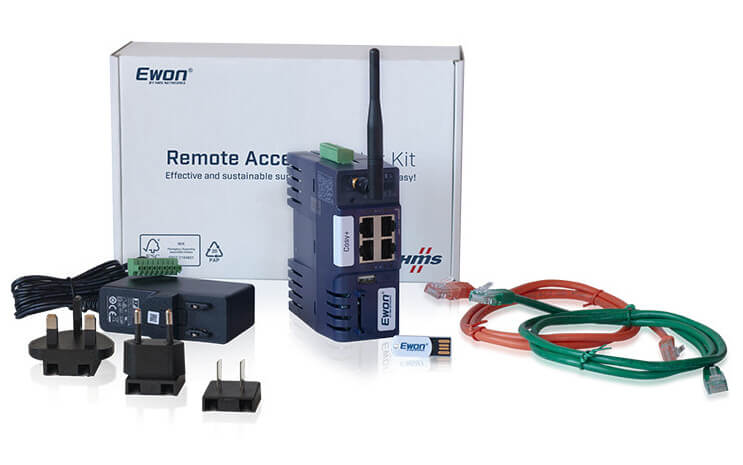
The Ewon Cosy+ WiFi is an industrial router designed for remote management of PLC control systems, HMI panels, computers or webcams via the 4G EU wireless WiFi network 2,4GHz. The Cosy+ series is characterized by the complete simplicity of router configuration and is easy to master thanks to the built-in wizard.
The Ewon router connects to the Talk2M cloud service and from that point on is available to registered users worldwide. Thanks to the unique Talk2M cloud service, communication with the Ewon remote router is very simple, reliable, secure and fast. At a glance, we can remotely program the PLC, back up data from the operator panel or monitor the production line via webcam. We connect the necessary peripherals to the router via Ethernet ports or USB port.
The Ewon Cosy+ industrial router is suitable for system integrators and machine builders who, thanks to the low price of the router, can automatically install it in their racks and subsequently gain the ability to connect to their customers' machines, monitor their operation, make program modifications, perform equipment diagnostics, download backups, etc.
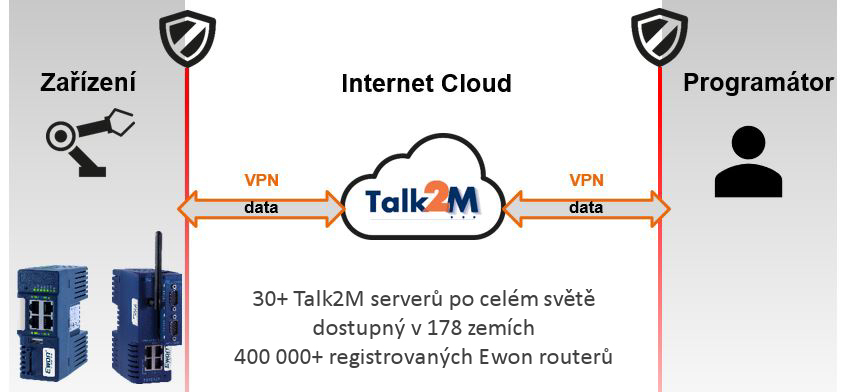
In the diagram below, you can see typical deployment of the Ewon Cosy+ on the factory floor. On the left, you can see the Cosy+ connected to several devices via Ethernet and USB (i.e. a PLC, an IP camera and an HMI panel).
The Cosy+ router is connected to the Internet and the Talk2M cloud service via a fixed Ethernet - WAN port and uses ports 443 (HTTPS) or 1194 (UDP). It can also be connected via a 2.4GHz WiFi network or a mobile operator's LTE network. All communication between the remote user and the Ewon router is over a secure VPN tunnel.
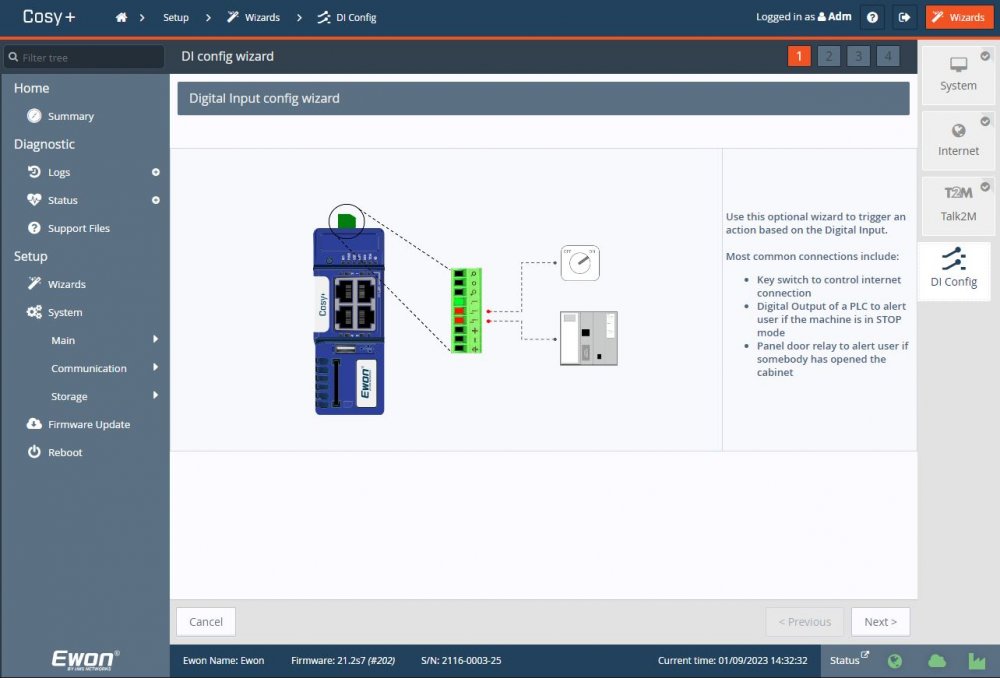
If you want to enable/disable remote connectivity from the Ewon installation site, you can install a switch in the door of the cabinet that you connect to the digital input of the Ewon router. By switching it, you enable the internet connection to Ewon, allowing your contractor to connect to Ewon and make the necessary adjustments. Once the modifications are complete, you will disable their access again. The Ewon Cosy+ has a second digital input and this can be used, for example, to control the opening of a switchboard door. In this case, Ewon will send you a text message or email and you will know that the door to the switchboard has been opened. The digital output is used to monitor the VPN connection, i.e. it will switch on e.g. the andon light on the switchboard, which will signal that someone is remotely connected to the PLC.

We can connect devices to the router via Ethernet cable, we have 3 LAN ports. If this is not enough, connect an 8-port Ethernet switch to the Ewon, or connect the router directly to an existing LAN. To connect a SIMATIC S7-300/400 PLC with an MPI or PROFIBUS port, we recommend using the ACCON NetLink PRO Compact adapter from Deltalogic. This adapter reliably converts the MPI/PROFIBUS protocol to Ethernet.
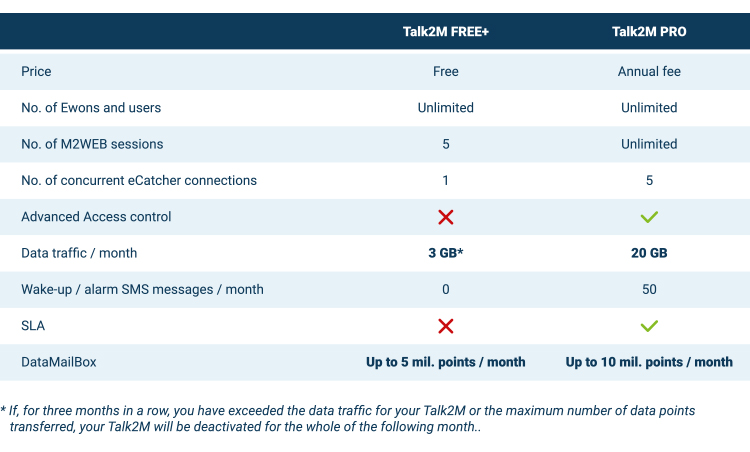
The router creates a remote connection via the Talk2M cloud service and you can connect to your devices remotely over a secure VPN connection from any computer, mobile and tablet connected to the internet. In Talk2M, you set up and enable access to specific IP addresses behind the Ewon, or specific Ethernet ports (applies to Talk2M PRO service). Connecting the Ewon Cosy+ router to the production line does not mean you automatically have access to all IP addresses on the network. Everything must be set up in your Talk2M account (access to any IP Address, selected IP Addresses, ports, etc.).
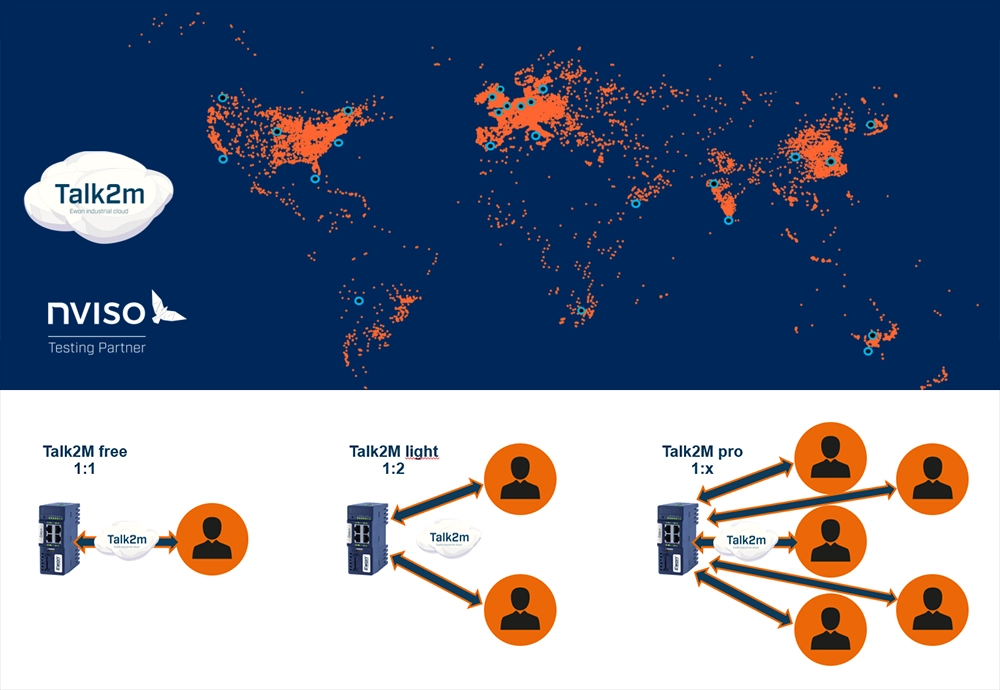
Talk2M is Ewon HMS's cloud service through which you connect remotely to Ewon routers. It is a large-scale data infrastructure based on 30+ servers in secure data centers around the world. For added reliability, the servers are operated by three independent providers. In the event of one provider failing, the Talk2M service will continue to operate.
Normally, Ewon routers are connected to the Talk2M cloud at all times. It is also possible to connect Ewon to the cloud based on our SMS message, or the router connects to the cloud just to perform a task. When it is finished, it will disconnect again. The remote user connects to Talk2M from his computer via the eCatcher.exe program (VPN client). If you cannot install software programs on your computer, then it is also possible to connect via the M2WEB portal.
You get the Talk2M service for free with the purchase of a router, or you get the Talk2M FREE+ service for free, which is sufficient for 90% of users. With the Talk2M FREE+ service, the programmer connects to only one Ewon = PLC router within his account, does the work, disconnects and can log on to another router. If you need to connect multiple users to one router at a time, or within a corporate account multiple users will be connecting to different Ewons at the same time, then choose the paid Talk2M PRO service. This service is suitable for machine builders or large factories where multiple programmers connect remotely to machines and equipment at the same time. The paid version of Talk2M PRO allows you to connect multiple users at the same time, set different user rights, offers better security options for accessing Ethernet stations behind the Ewon router, etc.
Comparing Talk2M Free+ and Talk2M Pro
Talk2M FREE+ (free) provides a connection between one user and one Ewon modem, with the proviso that if a second user wants to log in, the first user must log out. You can, of course, set up multiple Talk2M accounts and assign one Ewon modem to each. At that point, again, one user logs in to one modem and the other user logs in to the other modem. Together, however, you will never be logged in to one modem at a time.
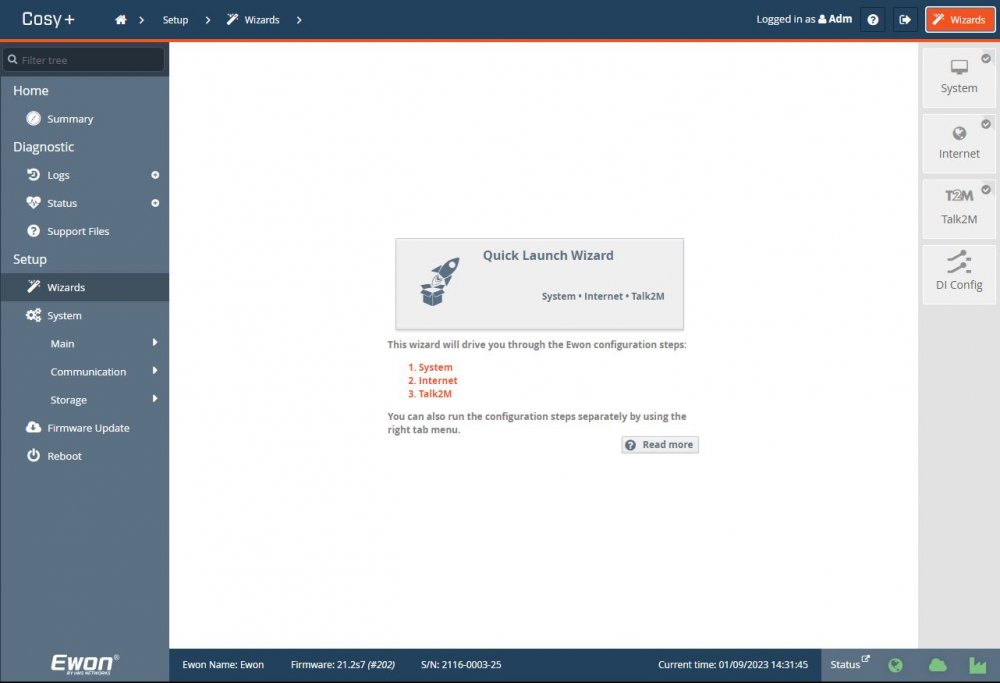
The Cosy+ is configured through its web interface. This interface comes with the Quick Launch Wizard, which guides your through the settings and informs you whether a particular setting has been saved or not. The router settings enable you to set the date and IP addresses, assign WAN port functionality to one of the router's ports, and connect the router to the Internet and the Talk2M service.
In the last step of the Wizard, you can configure the router's digital inputs. The router features 2 digital inputs, which are usually configured in the following way:
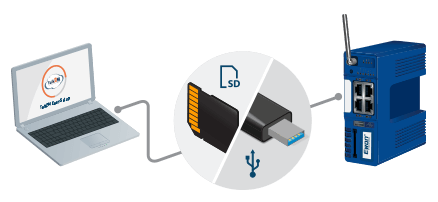
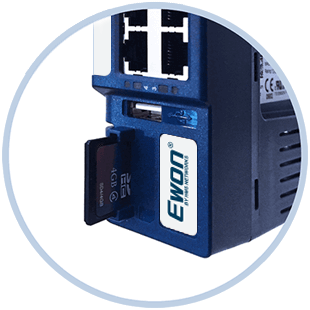
The SD card allows you to easily configure you Ewon Cosy+. You can use it to perform a firmware upgrade or to create or restore a system backup. Last but not least you can auto-register into Talk2M thanks to the Global Registration Key (GRK). When you insert the SD card containing the GRK, the router will automatically be linked to your account. You just need to insert the SD card containing the appropriate file in the Ewon. It will automatically process the file. Then remove the SD card from the Ewon, which will start a reboot. It is as simple as that. Please note that you have to upgrade to firmware v11 or higher to take advantage of this feature. Your settings backup file can be saved to the SD card or a USB stick.
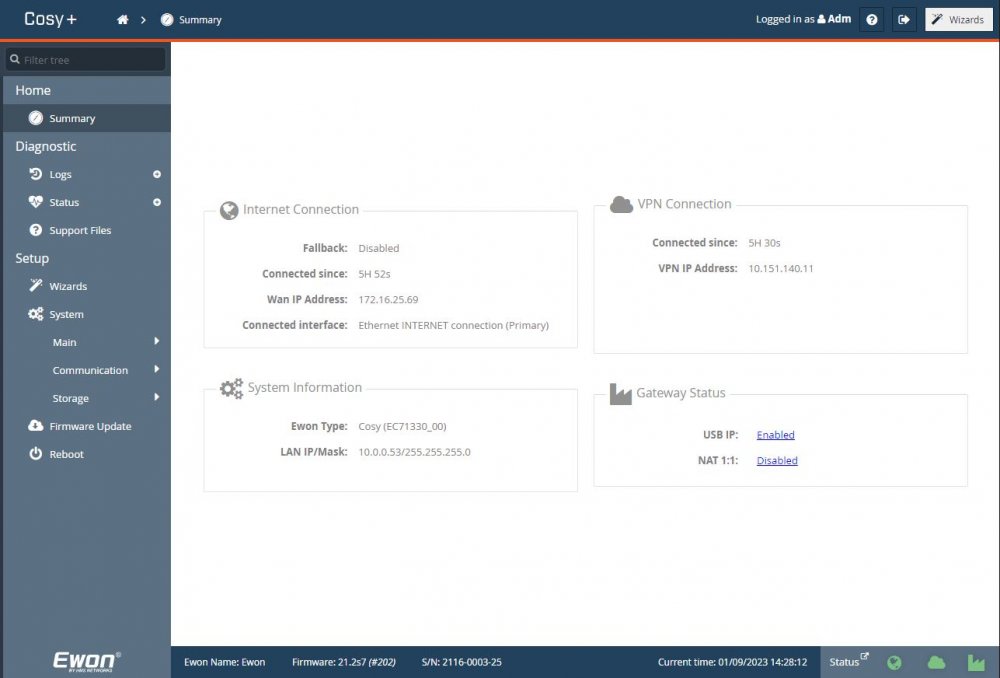
The Ewon Cosy+ title page provides a summary with all the essential information about the router's operation on a single page. You will find there such information as Internet connection status, IP address information, Connected to Talk2M since, the router as gateway setting, firmware version, etc.
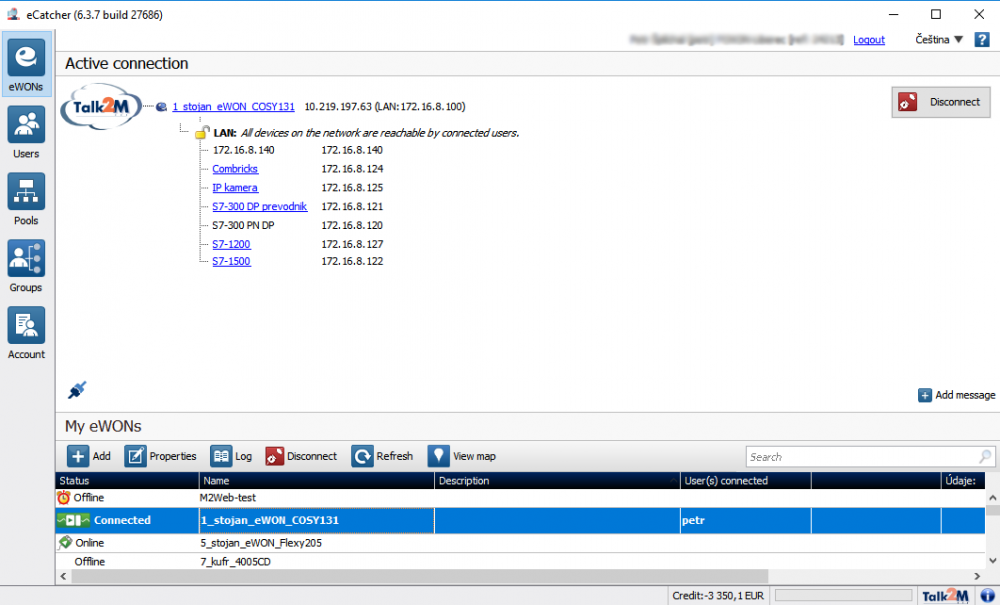
In the window below, you can see a secure connection between a computer and the Ewon Cosy+ via the Talk2M. Under the router's name, there is a list of all Ethernet devices connected to the router. By clicking on the blue links, you will be directed to the websites of the respective devices. The devices can also be accessed through third-party software (e.g. STEP7, TIA Portal, WinCC, etc.).