

Learn how to reload your Touch ‘n Go (TNG) eWallet easily through the EARNBACK App. Follow these simple steps to top up your balance and enjoy cashback rewards every time you transact.
.jpg)
Launch the EARNBACK App and go to the home screen. Tap the + Reload button beside your available balance to begin your top-up process.

Choose your preferred reload amount (e.g., RM50, RM100, RM200, RM300) or enter a custom value. Then select Online Payment and tap Submit.

Fill in your payer details and select FPX Online Banking as your payment method. Confirm the transaction to reload your EARNBACK wallet successfully.
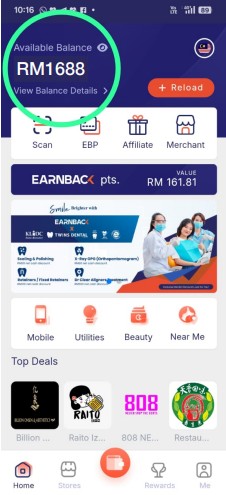
After payment, return to the home screen to check your updated EARNBACK balance. Your top-up amount will be reflected instantly once the transaction is complete.

In the EARNBACK App, tap the Utilities icon, then choose Touch ‘n Go eWallet PIN under the Bill Payment section.

Enter your mobile number linked to the TNG account and select your desired reload amount. Tap Pay Now to complete your purchase.
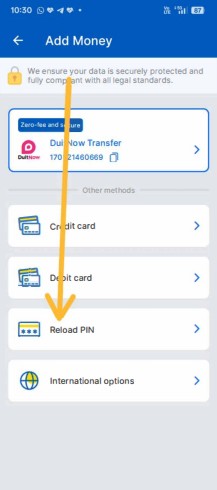
You’ll receive a TNG reload PIN via SMS or WhatsApp. Keep it secure — you’ll use this PIN to add balance to your TNG eWallet.

Open your Touch ‘n Go eWallet App, tap Add Money → Reload PIN, then enter the received PIN. The amount will be added to your wallet balance immediately.
Earn cashback every time you reload your TNG eWallet through EARNBACK. Stay rewarded with every transaction!

 Malaysia